Findings reference
Use Findings at /app/findings to inspect dependency advisories in your
application sources and their environment contexts.
Last verified on October 30, 2026.
Access and scope
Section titled “Access and scope”Viewers, members and administrators can read findings, copy prompts and export CSV. Members and administrators can also use Accept risk and Restore. Risk decisions require verified organization membership and write access on the server. Reading the screen and copying prompts have no plan restriction; Perpensa Rank display and explanations are included on Pro and Team.
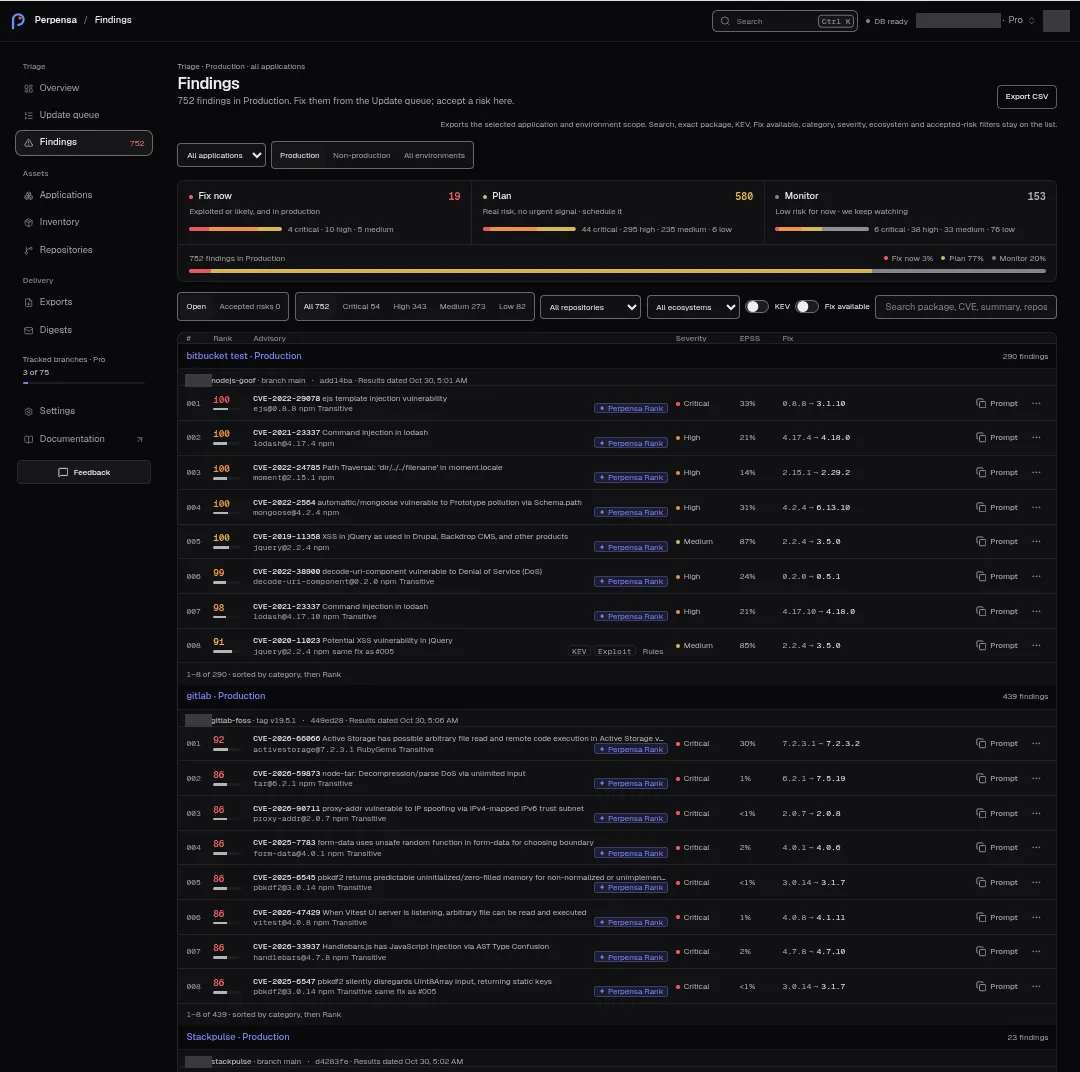
The application selector starts with All applications. Across applications, choose Production, Non-production, or All environments. Production is the default. Selecting an application resets the scope to Production and replaces those controls with an environment selector containing Production and that application’s named environments. A repository scope can further restrict the sources shown.
Results are grouped by application and environment, then repository source. Source headings identify the repository, branch or tag, available commit and result status. A finding shared by applications can appear on several lines; these lines are not a count of unique CVE identifiers. Also in identifies other application contexts when available.
See Applications for source configuration and Understand the results for interpretation.
Categories, search and filters
Section titled “Categories, search and filters”Fix now, Plan, and Monitor tiles show open finding counts, severity breakdowns and, when displayed, their percentage distribution. Accepted risks are excluded from that distribution. Select a category to filter; select it again to remove the category filter. Selecting a category from accepted risks returns to open findings.
| Control | Behavior |
|---|---|
| Open / Accepted risks | Switches between open and accepted contexts; the accepted option includes a count. |
| Severity | All plus severity choices with counts. Critical, high, medium, low and info choices appear when nonzero or selected. Counts are calculated before applying the severity filter. |
| Repository | All repositories or one repository in the selected application/environment scope. |
| Ecosystem | All ecosystems or one supported ecosystem label. |
| KEV | Restricts results to findings with a recorded positive KEV flag. |
| Fix available | Restricts results to findings with a usable corrective version shown in Fix. |
| Search findings | Searches package name and version, CVE/advisory identifier, summary, repository name and manifest path. The placeholder is Search package, CVE, summary, repository or path. |
Search ignores case and surrounding whitespace. Every whitespace-separated
word must match; ordinary words match substrings. Dotted versions match whole
version tokens: 4.17.2 does not match 4.17.20.
Links can carry exact package-name and package-version filters. Active filters appear as removable chips. Clear filters clears list filters and repository selection while preserving application/environment scope and the open finding. Filter changes return to the first page. Filters and the selected finding are represented in the URL. On narrow screens, Filters · followed by the active secondary-filter count opens the filter dialog.
Finding list
Section titled “Finding list”Within groups, findings are ordered by category urgency, then descending rank, with stable tie-breaking. Groups are ordered by urgency too. There is no interactive column-sort control.
| Column | What it shows |
|---|---|
| # | Position within the group’s ordered findings. |
| Rank | Rounded context rank, with a separate risk meter. |
| Advisory | CVE or fallback advisory identifier, summary, package and installed version; applicable Transitive, KEV, Exploit, ranking and shared-application labels. A same-fix note can identify another row with the same corrective change. |
| Severity | Recorded severity. |
| EPSS | Whole-percent exploit probability, <1% for a positive value rounding to zero, or — with EPSS unavailable. A zero or missing value is not displayed as 0%. |
| Fix | Installed version → corrective version, or No fix yet. A usable related update target takes precedence over the stored fix; comparable equal or older versions and placeholder versions are excluded. |
| Actions | Prompt copying and the row menu, including eligible risk decisions, Copy CVE, Copy prompt, and Open update when a related update exists. |
Desktop pagination uses Previous and Next, with Page and the current page/total. Each application/environment group contributes up to eight rows per page. Compact layouts use cards and Load more, extending the loaded prefix by another eight rows per group. End controls are disabled at their limits.
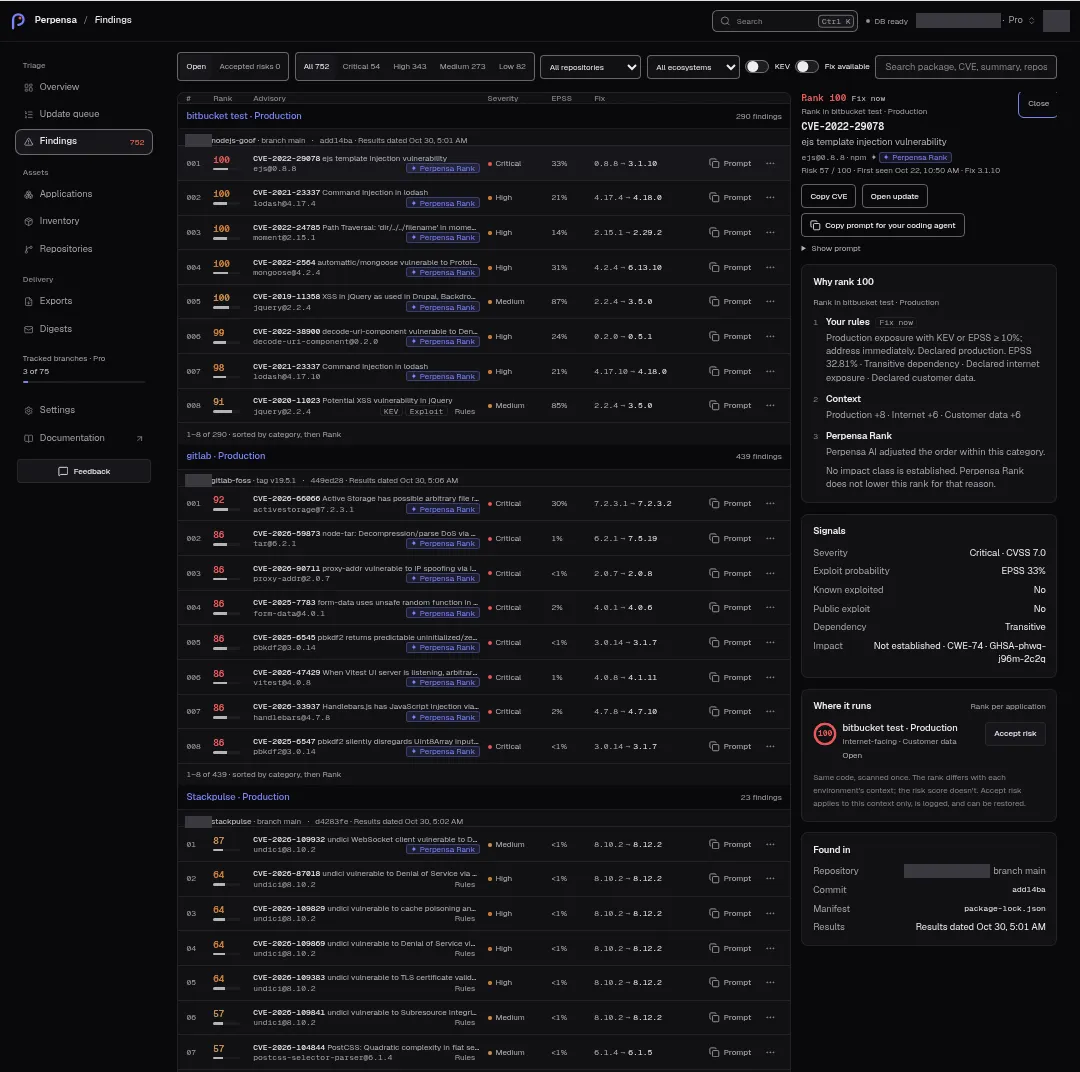
Select a row to open its detail. Depending on available width, the detail is beside the list, a side sheet, or full screen. Close or Escape closes it. J and K move through visible findings when keyboard focus is in the list, detail or page body; typing fields, menus and filter dialogs retain their own keyboard handling.
Finding detail and signals
Section titled “Finding detail and signals”The header shows Rank, category, its application/environment caption, advisory identifier and summary, package/version, ecosystem, applicable badges, Risk, available First seen date and Fix version or No fix yet. Risk is shown out of 100; a missing risk displays —. CVSS is formatted to one decimal place. Risk and rank are distinct values; the same source can have different ranks in different environment contexts without changing its risk score.
Why rank followed by the rank presents Your rules, Context, and, when eligible, Perpensa Rank explanations. Where it runs, captioned Rank per application, lists authorized application/environment contexts, their ranks, exposure details and risk-decision information. Open contexts show Open; moved-tag contexts can show Historical. Accepted contexts show Accepted by followed by available actor and date information. It can include contexts outside the current list filters. Without context it says No application context for this finding.
| Signals field | Display |
|---|---|
| Severity | Severity and CVSS score when available. |
| Exploit probability | EPSS percentage or Unknown. |
| Known exploited | Yes · CISA KEV, No when a negative status is known, otherwise Unknown. |
| Public exploit | Yes or No from the recorded flag. |
| Dependency | Direct or Transitive. |
| Impact | Recorded impact classes, advisory sources and available attack conditions. Missing classification shows Not established; contradictory classes show Sources disagree, and conflicting conditions can show Conditions differ between sources. |
These are recorded advisory signals. This panel does not display a separate reachability verdict or confidence score. Network attack conditions in Impact do not establish application-code reachability.
Found in shows available Repository and branch/tag, Commit, Manifest, and Results status. Missing fields are omitted. An eligible maintainer advisory carries Upstream maintainer advisory (published before OSV/GitHub review sync).
Perpensa Rank
Section titled “Perpensa Rank”On Pro and Team, Perpensa Rank marks an accepted rank refinement. Rules can instead indicate a review that retained the order, a review in progress, or unavailable review; its detail tooltip explains the state. Missing refinement or a plan without included ranking displays no mark. Rank refinement freshness is checked before the server attaches the display data.
When contexts are still under review, the page reports Perpensa AI is still reviewing followed by the finding count and Rules set the order meanwhile. Each finding counts once in that message even if several contexts are under review. The message is not a scan-progress percentage.
Accept risk and restore
Section titled “Accept risk and restore”Use Accept risk in a row’s actions menu or beside a context in Where it runs. Row menu entries identify the relevant environment when needed. The action applies immediately to that environment’s finding occurrence; there is no confirmation or reason-entry dialog on this screen.
Acceptance is a context decision, not a technical resolution or a change to Monitor. Other environments can remain open. The decision records the actor and time, writes an audit event, and refreshes the page data. Accepted contexts appear under Accepted risks; available decision information names the actor and date. Use Restore to return that context to open status. Both actions are disabled while a request is pending.
The server rejects decisions for missing active associations, closed occurrences or changed occurrence episodes, including Active environment association not found, Open occurrence not found, and Occurrence episode changed. Changed permissions can produce Workspace permission changed. Returned errors appear in a toast, with Decision failed as the fallback. A failed action does not establish that a decision was saved; reload the data before retrying against changed context.
Copying and update links
Section titled “Copying and update links”Copy CVE copies the displayed identifier. Success shows CVE copied; failure shows Could not copy the CVE.
The row’s Prompt button and Copy prompt menu item copy a remediation prompt. The detail offers Copy prompt for your coding agent and Show prompt. Copying is available on every plan and changes only the clipboard. Success briefly shows Copied and announces Prompt copied.
A row copy failure shows Copy is unavailable here and opens the detail. If copying in the detail fails, Copy is unavailable here. The prompt is open below, ready to select. appears and the prompt expands for manual selection. The detail also provides Set up MCP on plans without Pro/Team ranking, with a note about direct coding-agent queries on Pro and Team.
Open update navigates to /app/updates/<update-id> when a related update
exists, carrying list context. Opening the link does not apply the update.
Review the prompt and make the change in your own development workflow, then
rescan to verify the result. Perpensa does not apply version bumps or open pull
requests. See Remediate a vulnerability and verify the
fix.
Result dates and coverage
Section titled “Result dates and coverage”Read source headings and Found in → Results before relying on a finding.
| Source text | Meaning |
|---|---|
| Results dated | Recorded result date in local calendar time. |
| Refreshing | The source is refreshing; this is not a completed new result. |
| Results dated with Grace expires, or Results kept during grace | Earlier results retained during a failure grace period. |
| Not scanned | Pending source without completed results. |
| The last attempt did not finish | Failed source attempt. |
| The tag changed commit | The tracked tag moved. |
| Orphaned · historical results | Detached source with retained historical results. |
| No current results | Unsupported source state. |
Findings does not show a Stale or OSV cache badge. A visible dated result alone does not establish that the latest attempt succeeded.
Coverage unavailable. Reconnect the repository or open the application. lists affected sources with their applications and environments. Reconnect opens Repositories when offered; Open application opens the affected application or application list. These links navigate without repairing access or starting a scan themselves. Source-specific vulnerability-coverage notes can also appear. Missing coverage must not be read as zero vulnerabilities.
Export, loading and empty states
Section titled “Export, loading and empty states”Export CSV exports the selected application/environment scope and repository when selected. Search, exact package, KEV, fix availability, category, severity, ecosystem and accepted-risk filters apply only to the list, not the export. The caption explains this scope. Export is disabled while busy, loading or without a screen model. The server allows 20 export requests per organization per minute. Failures show the returned error or Export failed.
| Message | Meaning and available next step |
|---|---|
| Loading… / Loading findings | Initial data is loading. |
| Returned load error with Retry | Fetching failed. Previously loaded data can remain visible; select Retry to refresh it. |
| Scope unavailable | The selected scope could not be built; a more specific returned error can replace this fallback. |
| This finding is no longer in this scope. | The selected identifier cannot be opened from the catalog or retained finding record. |
| No application sources configured. | No sources exist in scope; members and administrators receive Configure Applications. |
| No results match these filters. | Current filters have no matching lines; Clear filters removes them. |
| No accepted risks in this scope. | No accepted contexts are listed. |
| Sources are scanning. Complete results will appear here. | Sources do not yet have complete results. |
| No open advisories in followed by the scope and optional Results dated | No open advisory lines in this scope; read the date and any coverage notes before drawing conclusions. |
An old selected record can still open historical detail labeled Accepted risk, Resolved, or Historical. Historical detail is not proof that the current sources have completed a fresh scan.