Digests reference
Use Digests at /app/digests to preview email, generate a Slack digest,
and review the current organization’s recorded digests and alert deliveries.
Last verified on October 30, 2026.
Access and scope
Section titled “Access and scope”Viewers, members and administrators can read digest and alert history. Members and administrators can use Preview email, Generate Slack and Refresh triage. These buttons are not hidden from viewers, but the server rejects their requests. Only administrators can manage shared delivery destinations, test delivery, or change organization schedules. Every role, including viewers, can manage its own email subscription.
| Capability | Starter | Pro and Team |
|---|---|---|
| Email preview and history | Available | Available |
| Personal email digest | Weekly after the scheduled scan | Daily, weekly or off; customizable time and sections |
| Slack digest | Unavailable | Available |
| Refresh triage | Disabled | Available for Perpensa Rank |
| Shared Slack/webhook alerts and custom organization schedules | Unavailable | Available |
The heading identifies the organization with Email + Slack digests for or Email digest for, followed by its name. Without Slack entitlement it adds Slack requires Pro. The Starter notice explains that email still uses risk-score ranking and Perpensa Rank requires Pro or Team.
Channel and generation
Section titled “Channel and generation”Channel offers Email and Slack, with Email selected initially. Slack is disabled without the entitlement, with Slack digests require Pro. as its explanation. Selecting a channel changes the generation action; it does not filter the history. There are no application, environment, recipient, date or text filters on this screen.
| Action | Consequence |
|---|---|
| Preview email | Builds and saves an email preview without emailing members. Recorded preview recipients come from up to 20 distinct nonempty administrator/member email addresses, excluding example and preview addresses. This list is not the personal subscription list. |
| Generate Slack | Builds a digest and attempts to send it to the organization’s configured Slack webhook. A failed or unavailable delivery can still leave a saved digest. |
| Refresh triage | Requests reconciliation of eligible findings for Perpensa Rank. Included processing continues automatically; existing saved digests stay unchanged. |
Generation is disabled while a digest request is running. The page displays Generating digest…, then Digest delivered., Digest saved. Open it below to review delivery details., or Nothing to digest. A saved nonempty digest opens automatically. A skipped result adds no history entry and leaves the currently open digest unchanged.
Manual previews and Slack digests use open updates projected from the organization’s application sources in Production environments, after the organization digest severity floor. An update qualifies while at least one context remains unaccepted. They include at most 10 updates, ordered by the highest open-context rank, then risk score. Context labels identify the relevant applications and environments. This is a preview window, not the entire queue.
For Perpensa Rank, Refreshing Perpensa Rank… is followed by No eligible open findings. or Perpensa Rank refreshed for a reported number of findings. That feedback is not proof that background processing has finished. The request is limited to 10 per minute per organization, and the button is disabled while it runs. A plan refusal says Perpensa Rank requires Pro or Team.
Digest history
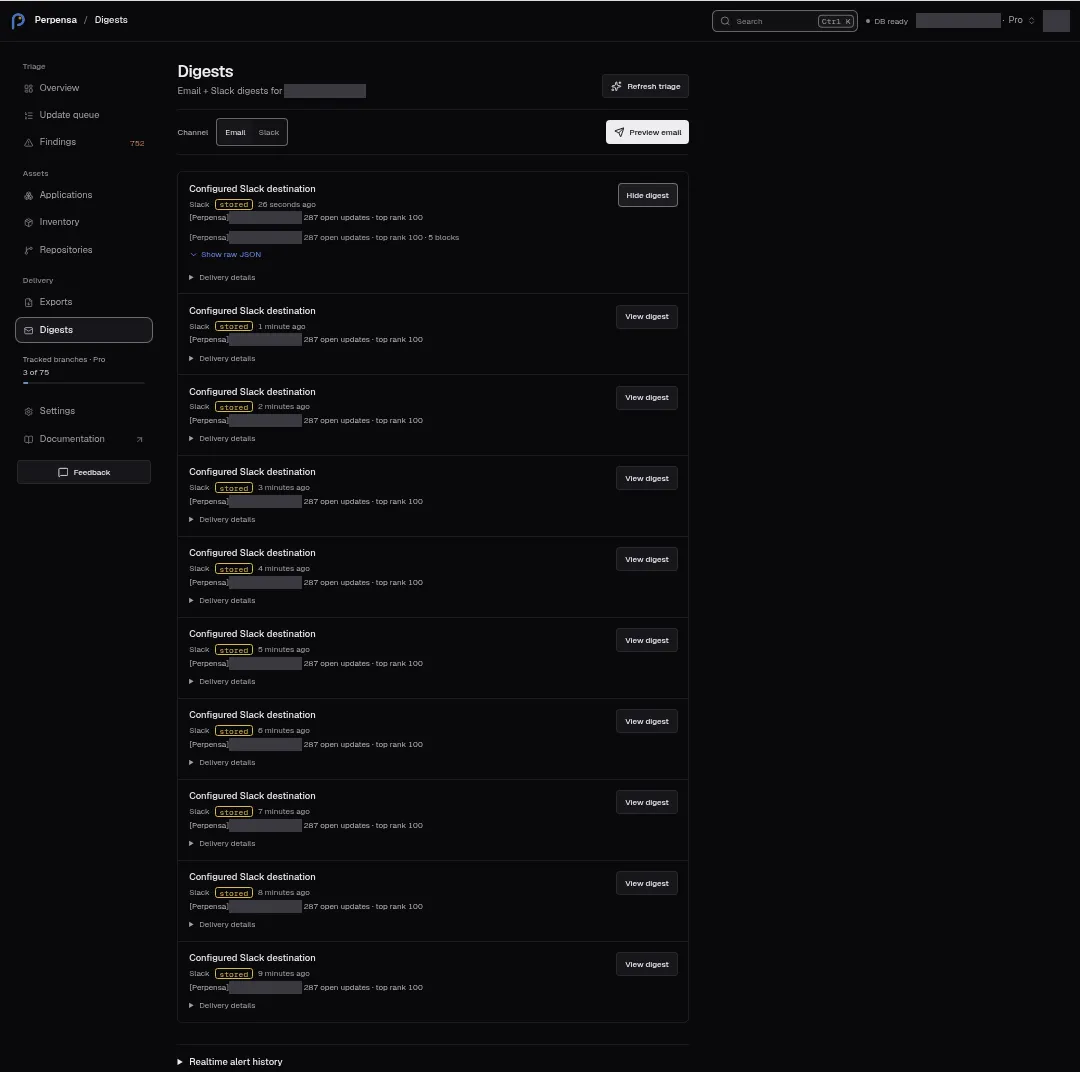
Section titled “Digest history”History loads the latest 10 saved entries for the organization, newest first, including both channels. The list has no pagination, and no action to send again or delete an entry. Each entry has the following fields and controls.
| Field or control | Meaning |
|---|---|
| Recipient line | Recorded email addresses separated by commas, or Recipients unavailable. Slack shows Configured Slack destination, without the webhook URL. |
| Channel | Email or Slack. |
| Status | A delivery tag; see the status table below. |
| Created date | Relative time of record creation. Hover for the exact UTC timestamp; the same timestamp is available to screen readers. Missing or invalid dates show Date unavailable. |
| Subject | The stored digest subject or Slack summary. |
| View digest / Hide digest | Opens or closes the stored body. Only one body is expanded at a time; opening it does not send it. |
| Delivery details | Independently expands the recorded item count, Top risk, delivery time and Reference: identifier. |
Delivery details shows Sent with a relative timestamp when a delivery time exists; otherwise it says No recorded delivery time. For manually built digests, the item count is the saved preview size, and Top risk uses the first item’s context rank when available, falling back to its priority or risk score. Do not interpret it as the maximum risk score across the whole queue.
Delivered personal email digests also enter this shared history. Their stored body replaces personal unsubscribe links with a notification-settings link. Their item count comes from the personal email content, rather than necessarily matching the manual preview window.
Delivery states
Section titled “Delivery states”| Tag | Meaning |
|---|---|
| delivered | A successful delivery is recorded; shown in the success color. |
| stored | Saved without a confirmed successful delivery; shown in the warning color. This includes email previews and unsuccessful manual Slack attempts. Unrecognized or missing stored statuses also display this tag. |
| error, failed, partial | A recorded problem status; shown in the danger color. The tag alone does not identify the cause or which recipients received a message. |
A skipped empty result is not saved as a digest row. A stored entry is not a pending-send guarantee. Delivery reasons shown immediately after generation are not included in the history’s Delivery details fields.
Read the body
Section titled “Read the body”Email with suitable stored HTML opens an Email digest preview in a sandboxed frame. Use Show plain text and Hide plain text to expand or collapse its text alternative. Other email content can appear directly as plain text.
Slack bodies show a payload summary with the channel, text and block count when available. Show raw JSON and Hide raw JSON toggle the saved payload; an unparseable payload uses Slack Block Kit payload as its summary. These controls only change the preview.
Schedule and personal email
Section titled “Schedule and personal email”Digests has no schedule editor. Open Settings → Notifications and see Choose your email notifications for the full personal subscription workflow.
| Setting | Behavior |
|---|---|
| Your email notifications | Applies only to you in the current organization, including when you are a viewer. |
| Follow-up emails | Turns your digest and selected alerts on or off. Invitations, billing and requested tests remain available. |
| Email digest | Pro and Team offer Daily, Weekly and Off; default is daily at 08:00 UTC. |
| Digest sending time | Hour from 00:00 through 23:00, timezone and, for weekly delivery, weekday. Local daylight saving changes are respected. |
| Digest sections | New findings and KEV, Available updates, Final scan failures, and SLA breaches; all selected by default. |
| Digest severity | info, low, medium, high or critical; default medium. Applies to findings and updates; KEV stays visible in its selected section. |
| Save email preferences | Saves your choices; Saving… appears while pending. |
Starter uses a weekly digest after the scheduled scan, with known exploited vulnerabilities first and final scan failures included. Advanced personal choices are unavailable on Starter. Empty personal digests are skipped.
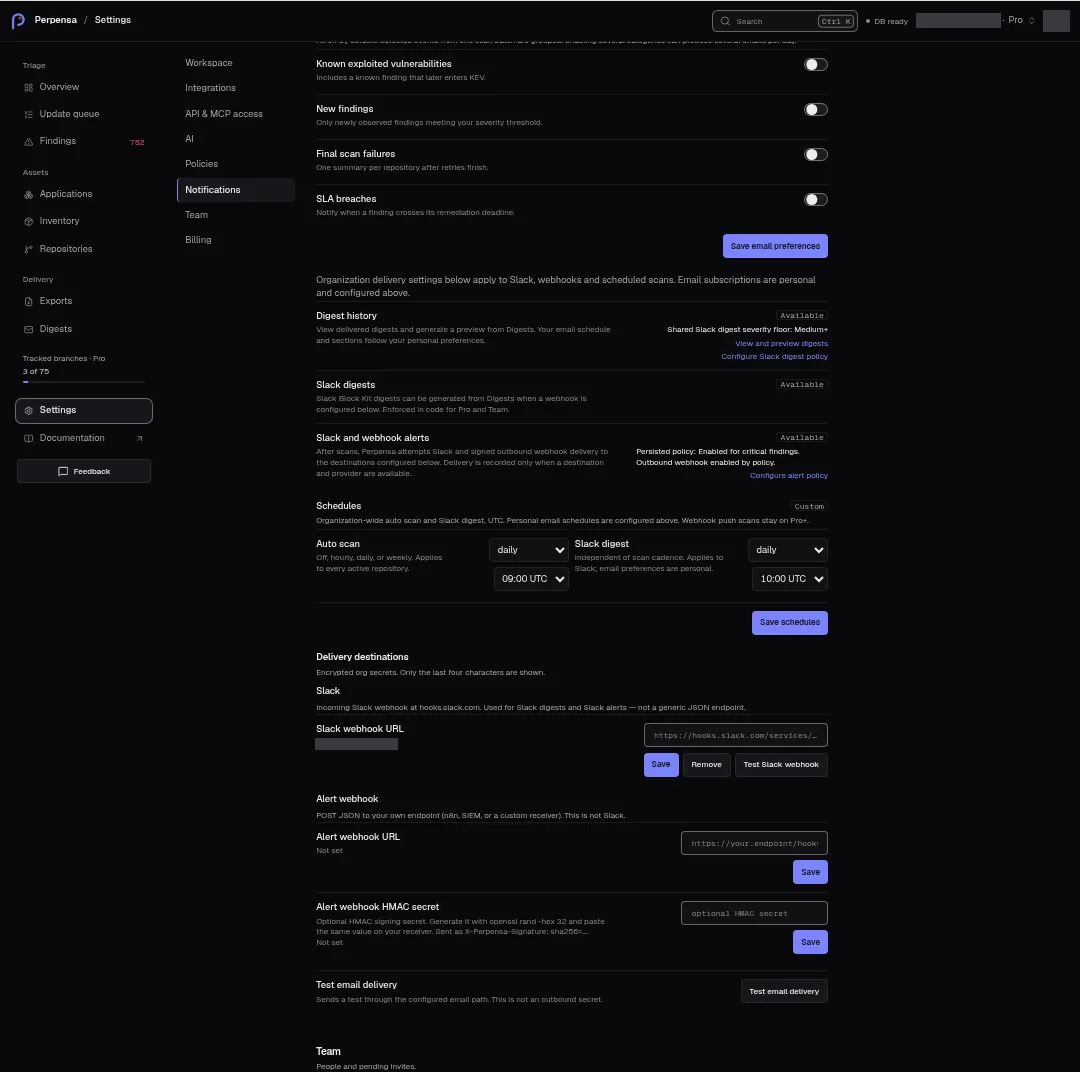
Administrators on Pro and Team also have Settings → Notifications → Schedules, marked Custom. Slack digest offers off, daily, or weekly, with Hour (UTC) and, for weekly delivery, Weekday (UTC). The default is daily at 08:00 UTC, independent of scan cadence. Save schedules saves both the auto-scan and Slack digest settings; feedback is Schedules saved or the returned error, falling back to Could not save schedules. During saving the button says Saving….
Starter schedules are marked Fixed and describe Email digest as After the weekly auto scan · email only. Non-administrators see Only organization admins can change schedules.
The scheduled Slack job saves content without posting it. A schedule or stored Slack row does not establish delivery. Use Generate Slack to build and attempt delivery of a new digest from the current queue; it does not send an old row again.
Channels and delivery destinations
Section titled “Channels and delivery destinations”Administrators configure Settings → Notifications → Delivery destinations. Values are encrypted organization secrets, entered in password fields; saved values expose only their last four characters.
| Field or action | Purpose and consequence |
|---|---|
| Slack webhook URL | An HTTPS incoming webhook at hooks.slack.com, used for Slack digests and Slack alerts. Requires Pro or Team. |
| Alert webhook URL | Your own JSON receiver for alerts, distinct from Slack and from digest delivery. Requires Pro or Team; production requires HTTPS and blocks private/local destinations. |
| Alert webhook HMAC secret | Optional signing secret, shared with your receiver. The signature is sent in X-Perpensa-Signature as sha256=…. |
| Save | Saves or replaces that field after the sensitive-action confirmation flow. Success shows Secret saved with the last four characters and clears the input. |
| Remove | Offered for an organization-saved value. Removes that secret after confirmation; success shows Org secret removed. Future deliveries cannot use the removed value. |
| Test Slack webhook | Posts a test message to the configured destination. Disabled while testing or without Slack entitlement. |
| Test email delivery | Sends a requested test to the acting administrator’s organization-member email through the configured email path. This is separate from digest previewing. |
Tests are limited to five Slack tests and five email tests per minute per organization. A test confirms only its own attempt, not delivery of an earlier digest. Saved destination values are limited to 4,000 characters. Empty input produces Enter a value first. Fields and save controls are disabled when saving is unavailable, the plan disallows the destination, or that field is being saved.
Destination status is Not set or Saved · last four followed by the recorded suffix. Organization delivery uses only your organization’s own destination and never falls back to a shared one.
Realtime alert history
Section titled “Realtime alert history”Expand Realtime alert history beneath the digests. It loads up to 25 recent organization deliveries, newest first, for email, Slack and webhooks. Each row shows the channel, raw delivery status, relative date, event type and entity identifier. Severity and provider are not displayed as separate fields.
Slack/webhook records use delivered, stored when sending is disabled or
no webhook is available, and failed for other failures. Delivered personal
email alerts also appear here, with event types such as finding.opened,
finding.kev, sla.breach and scan.failed.
An error uses Notification could not be delivered. Try again later or contact
support (code: delivery_failed). A recorded HTTP failure substitutes a bounded
code such as http_400. There is no retry action on these rows.
Empty states and troubleshooting
Section titled “Empty states and troubleshooting”No digests yet. offers guidance to Preview email, optionally generate Slack, or open the update queue. History loading has no dedicated progress message or visible load-error message; a failed fetch can leave existing data visible. An empty list alone does not establish that nothing was ever delivered.
| Message | Interpretation or next step |
|---|---|
| Could not generate the digest. Try again. | The generation request failed, including a possible permission refusal. Check your role and retry when appropriate. |
| Could not refresh Perpensa Rank. Try again. | The triage request failed; existing digests are unchanged. |
| Nothing to digest | Generation skipped saving and sending. Read the accompanying reason below. |
| No open updates in the queue — nothing to send | No open updates were available. |
| No open updates found, but some sources were not fully scanned or lack advisory coverage — nothing to send | The empty queue is unverified; inspect source coverage before treating it as clear. |
| No open updates meet the org digest severity floor — nothing to send | Open updates were excluded by the severity floor. |
| Email digest stored (not delivered) | A preview was saved. This is an email preview. Scheduled delivery follows your preferences in Settings → Notifications. explains normal preview behavior. |
| Slack digest stored (not delivered) | Content was saved without a successful Slack delivery. Set a Slack webhook in Settings → Notifications identifies a missing destination. |
| Slack digest delivered / Email digest delivered | Successful delivery feedback when supplied; Preview email itself never sends email. |
| Digest generated | A result was returned without delivery details; this is not a delivery confirmation. |
| Could not load alert deliveries. | Alert-history loading failed. |
| No alert deliveries yet. | No alert rows were returned. |
| Delivery destinations could not be loaded. | Destination loading failed; the returned error is also shown, falling back to Failed to load secrets. |
| Your delivery destinations can’t be saved right now. Contact support (code: secrets_key_missing). | Saving is unavailable right now; contact support. |
| Available on Pro and Team. | The plan does not include this destination or custom schedule; selecting the hint opens Billing. |
| Slack webhook OK, Webhook not configured, Webhook test failed | Slack test outcome; read the accompanying reason. |
| Email sent / Email outbox | Email test delivered or was retained without delivery; read the reason. |
| Save failed, Delete failed, Email test failed | Fallback errors when the operation supplies no more specific message. |
Delivery failures use Email could not be delivered. Try again later or contact support (code: delivery_failed). or the corresponding Slack message; recorded HTTP failures substitute their status code. Email-provider configuration problems use Email delivery is unavailable right now. Contact support (code: no_email_provider).
An email preview without real eligible addresses can report No real member emails on this org — example addresses are never sent. Add org_members with real addresses. This is not a prompt to edit recipients on Digests: the screen has no recipient editor. Email tests can also return Recipient required or Recipient not allowed — use an org member email.
A saved scheduled Slack digest can be explained by This digest was saved
without sending. Open Digests and use Generate to send it (code:
outbound_disabled). The current action is Generate Slack, which creates
a new digest. Destination validation can return Invalid Slack webhook: or
Invalid alert webhook URL: followed by a validation code, such as
slack_host_invalid, webhook_https_required or webhook_host_blocked.
Read the recorded status and timestamp together. A preview, stored payload, successful test, or empty history is not confirmation that a particular digest reached its recipients.