Exports reference
Exports at /app/exports generates files from your organization’s stored
Production application sources. See Exporting results
for the download workflow.
Last verified on October 30, 2026.
Access, scope and limits
Section titled “Access, scope and limits”Viewers, members and administrators can generate and download these exports. The screen has no paid-plan gate: Starter, Pro and Team use the same export actions. The header shows the organization name and plan; a missing organization name appears as Organization unavailable.
This screen has no application, repository, environment, search or status filters. It uses Production environments across the active organization. Repositories outside those application sources are not included. A shared source’s same package at the same target path is exported once, with its application and environment contexts retained. The same package from different sources or target paths can appear more than once.
Generating an export reads stored results; it does not run a scan. The header shows Oldest stored Production scan: with a relative date when available. Exact UTC dates are available on hover and to assistive technology. This is the oldest available complete-result date, not a guarantee that every Production source has a result.
| Header state | Meaning |
|---|---|
| Checking stored results… | Source data is loading. |
| Stored Production scan freshness unavailable. | The freshness lookup failed. |
| No stored Production scan available. | No valid complete-result date was found. |
These header states do not disable generation. All generation buttons are disabled while an export request is running. The server allows 20 generation requests per organization per 60-second rate-limit window.
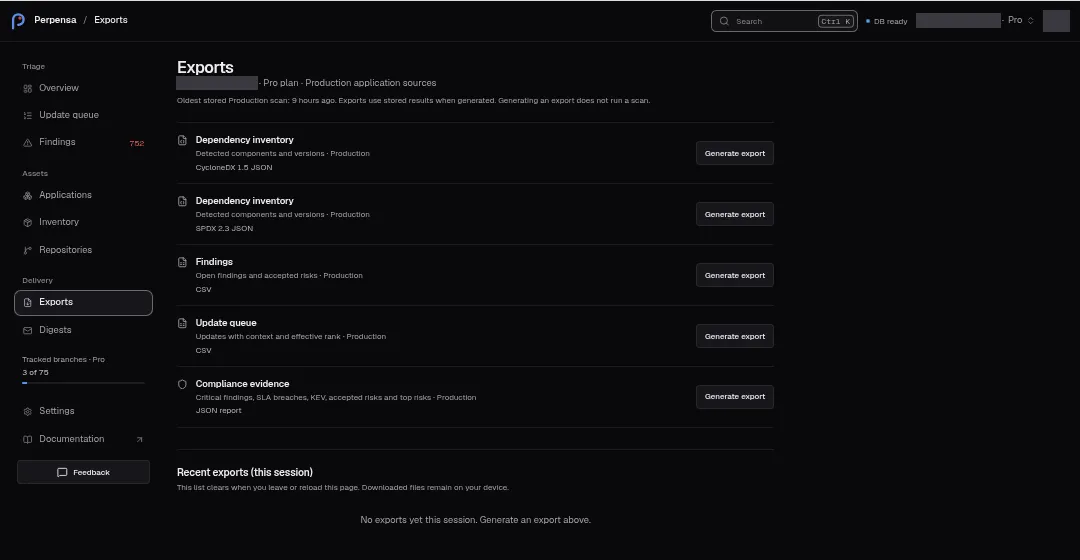
Available exports
Section titled “Available exports”Each row has Generate export. Its label becomes Generating… for the selected format. Successful generation starts a browser download automatically.
| Export | Format shown | File name |
|---|---|---|
| Dependency inventory — Detected components and versions | CycloneDX 1.5 JSON | <organization-slug>-sbom-cdx-<YYYY-MM-DD>.json |
| Dependency inventory — Detected components and versions | SPDX 2.3 JSON | <organization-slug>-sbom-spdx-<YYYY-MM-DD>.json |
| Findings — Open findings and accepted risks | CSV | <organization-slug>-findings-<YYYY-MM-DD>.csv |
| Update queue — Updates with context and effective rank | CSV | <organization-slug>-updates-<YYYY-MM-DD>.csv |
| Compliance evidence — Critical findings, SLA breaches, KEV, accepted risks and top risks | JSON report | <organization-slug>-compliance-<YYYY-MM-DD>.json |
File dates use the generation date in UTC. A missing organization slug falls
back to org.
Dependency inventory files
Section titled “Dependency inventory files”Both SBOM formats include detected package names, available versions, package URLs (purls), generation metadata, scope, and source provenance. Provenance records the source and repository, branch or tag, scanned commit, target path, result date, availability, and application/environment contexts.
| Format | Contents and interpretation |
|---|---|
| CycloneDX | Version 1.5, document serial number, Perpensa tool metadata, organization name and dated version, organization ID, plan, repository count and scope properties. Each component has type library, a source/path-qualified bom-ref, name, purl, and version when known. Properties carry repository, path, layer, finding count and source provenance when available. |
| SPDX | Version 2.3, CC0-1.0 document data license, document identity and namespace, creation information, packages and document-to-package DESCRIBES relationships. Packages have an SPDX ID, name, purl reference and version when known. Document annotations carry scope and organization ID; package annotations carry provenance. |
The inventory projection supplies no package license values. CycloneDX therefore
omits component licenses, and SPDX writes NOASSERTION for declared and concluded
licenses. SPDX also writes downloadLocation: NOASSERTION and filesAnalyzed: false.
The document’s data license is not a package license determination.
CycloneDX maps direct dependencies to required and transitive dependencies to
optional; these values do not describe runtime versus development scope.
For LuaRocks components with unknown directness, that field is omitted.
LuaRocks metadata is retained in a CycloneDX property or SPDX package comment.
Unknown ecosystem mappings use generic purls. Versions absent from the detected
inventory remain absent from the version field and purl.
These files are component inventories, not dependency graphs: CycloneDX emits no
dependencies section, and SPDX emits no package-to-package dependency edges.
CycloneDX’s finding count property is not a full vulnerability record; use the
findings CSV for finding details.
CSV fields
Section titled “CSV fields”Column names below are file headers, rather than screen columns.
| File | Specific columns |
|---|---|
| Findings | id, cve, package, version, ecosystem, severity, risk_score, epss, kev, state, sla_breached, repository_id, summary |
| Update queue | id, package, from, to, severity, risk_score, effective_priority, ai_delta, state, repository_id, suggested_action |
| Both | source_id, ref_kind, ref_name, commit_sha, target_path, contexts_json, automatic_category, result_dated_at, availability, exported_at, scope_json |
The context JSON retains application/environment information and accepted-risk decisions. Context actor display names are removed from these CSVs. Update priority, delta and suggested-action fields are blank when the corresponding stored ranking data is absent. Perpensa Rank data is exported when available; generating a file does not request a new ranking.
Missing values become empty CSV cells. A value that a spreadsheet could read as
a formula receives a leading apostrophe: it begins with =, +, @ or -,
possibly after whitespace, or it begins with a tab or a carriage return. Quotes,
commas and line breaks are escaped.
Compliance evidence
Section titled “Compliance evidence”The JSON report contains scope, generation time, organization metadata, finding source provenance and automatic categories, policies, and summary counts for repositories, packages, open findings, critical/high open findings, SLA breaches, open/suppressed updates and ranked updates. Finding contexts retain acceptance decisions while omitting actor display names.
Detailed sections include at most 25 SLA breaches and the first 15 qualifying
open updates as topRisks, plus known-exploited open findings in kevFindings.
The criticalSlaBreaches summary key counts all selected open SLA breaches;
it does not apply a separate critical-severity filter. These detail limits do
not limit the summary counts. The report explicitly states that it is not a
certified audit artifact.
Recent exports and feedback
Section titled “Recent exports and feedback”Recent exports (this session) lists newest requests first. Each entry shows its export name and format, Production, relative request time, and generated content size. Format labels are CycloneDX, SPDX, CSV or JSON. Sizes use UTF-8 bytes: B, KB or MB, with one decimal for KB and MB; — means content is not available yet.
| State | Feedback and available action |
|---|---|
| Generating | The format row shows Generating export…; the recent entry shows Generating…. |
| Ready | The format row shows Export ready to download.; Download downloads the same generated file again. The newest ready entry has the emphasized download button. |
| Failed | The format row shows Export failed. Try again.; the recent entry shows Failed. Use Generate export to make another request. |
| Empty session | No exports yet this session. Generate an export above. |
The format row reports its latest request. Leaving or reloading the page clears the list. Changing organization or user starts a new list. Downloaded files remain on your device. Downloading again uses the retained file contents; it does not refresh results.
Stored-result limitations
Section titled “Stored-result limitations”Sources without usable stored inventory contribute no packages. Exports can retain older complete results during refresh or failure grace, the previously accepted commit’s inventory for a moved tag, and detected inventory from an unsupported result. Read the provenance availability and result dates before using a file as evidence of current coverage. An empty inventory or findings file does not prove that every source was scanned or has no vulnerabilities.
The SBOM builder does not emit file hashes, file analysis, a complete dependency graph or full vulnerability objects. Exporting does not change dependencies. See Inventory for inspecting detected components.
API & MCP download links
Section titled “API & MCP download links”Download export at /app/machine-exports?org=<organization-id>&export=<export-id>
is a separate download page for stored API & MCP export jobs. It does not show
the Exports screen’s session list or generate a new file. See
API and CI gate for the related workflow.
Viewers, members and administrators with current membership in the file’s organization can download, but the original API & MCP access must still authorize the file and its application/source scope. That access requires Pro or Team, export permission, and valid organization authorization; expired, revoked or otherwise unauthorized access can block the download. Files expire 24 hours after becoming ready and must still be ready to download.
Download file is disabled while downloading or when either URL identifier is missing. During the request, the page shows Preparing download…. Success shows Download started. A rejected or failed request shows This export is unavailable. Check its expiry and access permissions. The page does not expose a more specific error or a regeneration action. A successful human download is recorded in the API & MCP audit log.